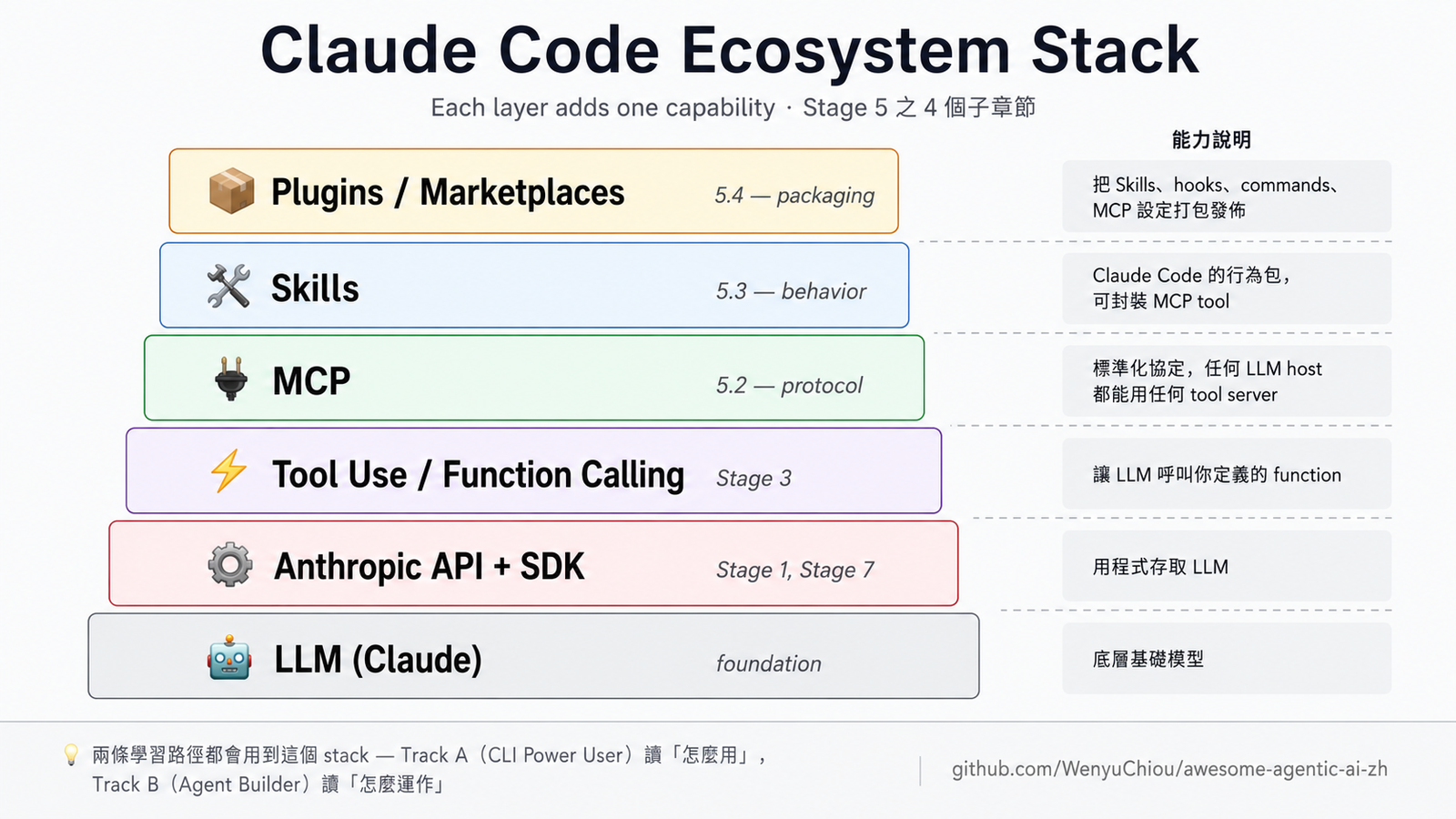
A3 — Integration & Production
← A2 — CLI Workflow Patterns · Track A: CLI Power User — Stop 3 (final)
⏱ Time estimate: 1-2 weeks (~8-15 hours)
📋 Chapter structure: Learning goals → Entry conditions → Required reading → Hands-on exercises → Curated Projects → Self-check 🔑 Key terms (used in this chapter):
- Required here: MCP (connect CLI to external data / tools), CI (run checks automatically on every push)
- Further-reading terms: observability (trace CLI behavior), eval (measure CLI quality), prompt caching (reduce repeated-context cost), cost tracking (record token spend)
Full definitions:
resources/glossary.en.md5 + 6
After your CLI runs smoothly, the next step is to wire the CLI into your real team workflow. This stop does 3 things:
- Tool connection — MCP servers connect the CLI to Slack / Gmail / your internal API
- Automated checks — CI (GitHub Actions) runs CLI review on every PR
- Cost and logs — observability tools track cost / latency for each task
After this stop, the CLI is no longer just your personal tool — it's part of your team's workflow.
📌 Learning Goals
- Connect 1-3 MCP servers to your CLI (Slack / Gmail / internal API / DB)
- Set up GitHub Actions to auto-run Claude Code (PR review, release notes, etc.)
- Add observability (trace, cost, latency) to CLI workflows
- Plan a cost budget — know roughly what a big task costs in tokens
📚 Required Reading
- Stage 5.2 — MCP (Model Context Protocol) — MCP concept and basics
- Anthropic — Prompt Caching — can significantly reduce repeated context cost under cache-eligible conditions (unchanged context, ≤5-minute reuse window, etc.); actual savings depend on the workflow, so use the official article's conditions as the reference
- Stage 7 — Observability section — langfuse / Helicone / weave
resources/cli-agents-guide.en.md"Common pitfalls" — most common production issues with CLIs
🛠 Hands-on Exercises
Exercise CLI-9: MCP server connected to CLI
Following Stage 5.2 Exercise: MCP client, connect at least one useful MCP server to your CLI:
filesystemserver → let the CLI read files outside its default scopegithubserver → let it read PRs / issues directly- Custom server → connect your internal API / DB
Success: in a CLI conversation, ask "does my PR have conflicts?" and have the CLI answer via MCP (without you opening a browser).
Exercise CLI-10: GitHub Actions + CLI
Write .github/workflows/cli-review.yml:
- Trigger: PR opened / synchronize
- Run: in the GH Actions runner, execute Claude Code (or Codex), feed it
git diff+ your.claude/commands/review.md - Output: PR comment
Success: open a new PR, see a review comment within 1-2 minutes.
Starting points: Anthropic's official
claude-code-action; Codex has GitHub App and CLI modes.
Exercise CLI-11: Cost tracking
Run a daily task. Predict the token usage first, then actually run it and check the usage. The gap is usually big (you typically underestimate).
- Math: input tokens + output tokens × model price each
- Connect langfuse or Helicone (Stage 7 Observability) for tracing
- Observe: which sub-task consumes the most tokens? Are you sending unnecessary long context?
Exercise CLI-12: Skill / plugin team sharing
Package your .claude/commands/ and CLAUDE.md into a plugin, publish to internal marketplace or GitHub. Teammates claude plugin install and get the same workflow.
- Skill / plugin details in Stage 5.3 + 5.4
- Template: anthropics/claude-plugins-official
🧭 Advanced Concepts in Daily CLI Work (7 Playbooks) 🆕
Track A users are already using Stage 7.5 advanced concepts — they just have not named them yet. Pick the 2-3 playbooks you use most often and treat the rest as further reading — each in ≤ 6 lines. Want the deeper theory → go to Stage 7.5.
📌 Rule: after each playbook, ask yourself "will I do something differently in the next PR?" Yes → applied; No → skip to the next one.
📋 Playbook 1: Scope unclear, agent overreaches
When: You send Codex/Gemini on a sweep and are not sure whether it will silently touch unrelated files (the F11/F12 kind of failure)
Do: At the top of the brief, state "change X / do not cross Y" explicitly; add a path filter to the acceptance preset
Concepts: Work Boundary + Hierarchical Task Decomposition · 📊 See concept-cluster, Service × orchestration cluster
Read more:
Source Link HumanLayer Writing a good CLAUDE.md Anthropic How Anthropic teams use Claude Code (PDF) Internal Stage 7.5 🧭 work boundary stack

📋 Playbook 2: Multi-agent parallel runs, results conflict
When: Claude planner + 2-3 Codex agents run in parallel and the merge ends up with conflicts / drift
Do: Give each agent its own commit; use a reviewer pattern to catch drift (not one giant merge); standardize the brief format +
result.jsonschemaConcepts: Contract Hand-offs + Speculative Parallel · 📊 See concept-cluster, Service × orchestration + Types × orchestration
Read more:
Source Link Addy Osmani Code Agent Orchestra Daniel Vaughan Running Multiple Codex Agents Parallel Internal agent-collab-skills ( agent-task-splitter+agent-output-reconciler)
📋 Playbook 3: Reviewing agent output
When: An agent finished the PR, you do not want to merge it blindly, and human review cannot keep up with the throughput
Do: Add an LLM-as-judge subagent for automatic evaluation (binary pass/fail); humans only spot-check edge cases; run the acceptance-gate preset before commit
Concepts: Agent-as-Judge + Plan-Act-Reflect · 📊 See reading-decision-tree, blue eval branch
Read more:
Source Link Hamel Husain LLM-as-a-Judge: Complete Guide Hamel Husain Your AI Product Needs Evals Simon Willison Sub-agents in Claude Code

📋 Playbook 4: Dispatching subagents for independent tasks
💡 First time hearing about subagents? In one sentence: a subagent is a “child Claude” spawned from the main Claude session. It has its own isolated context and reports back when done. Dispatch means asking the subagent to do work, like assigning a task to a teammate. Full concept → Stage 5.5.
- When: before committing a large change / entering an unfamiliar repo / running an LLM-as-judge auto-eval / applying the same review to 4 targets
- Do: invoke Claude Code built-in subagents (no custom file required):
code-reviewer— review staged diff, find bugs + security issuesExplore— read-only codebase search, find entry points / symbolsPlan— design a step-by-step implementation plangeneral-purpose— fallback when you are unsure which one to use, or for multi-step research
- Concepts: Hierarchical Task Decomposition + Context Isolation · 📊 See concept-cluster, Service × orchestration cluster
- Read more:
- Stage 5.5 Subagents (full theory + decision table)
resources/subagent-cookbook.en.md(15 recipes with copy-paste prompt templates)
📋 Playbook 5: Running CLI agent in CI
When: You wire
codex exec/claude --printinto GitHub Actions, cannot require a human to hit yes every time, and bandwidth constraints mean you cannot always use OpusDo: Use layered autonomy (preset auto-runs / commit requires review / push requires human sign-off); set a fallback cheaper model (if Opus is down, fall back to Haiku)
Concepts: Autonomy Gradients + Graceful Degradation · 📊 See concept-cluster, Config × governance cluster
Read more:
Source Link Anthropic How Anthropic teams use Claude Code (PDF) Anthropic Engineering Equipping Agents with Skills Internal Stage 5.5 Subagents + Exercise CLI-10
📋 Playbook 6: Controlling cost
When: You use Codex for a large batch of work, the monthly API bill is getting out of control, and you want to stay inside budget
Do: Set
max_cost_usdinplan.yml; use a cheap model (Haiku) for exploration and an expensive model (Opus) only for polish; turn on prompt caching (can significantly reduce repeated context cost under cache-eligible conditions); automate QA instead of spending human timeConcepts: Cost-aware Budget Gates + Throughput-Merge Philosophy · 📊 See concept-cluster, Config × resilience cluster
Read more:
Source Link Simon Willison Sub-agents Anthropic Prompt Caching Internal This stage's Exercise CLI-11 (token tracking + langfuse integration)
📋 Playbook 7: Hardening workflow, preventing drift
When: You wrote rules in
CLAUDE.md/SKILL.mdbut nobody enforces them, or you added a preset YAML and do not know whether it actually worksDo: Intentionally break one rule and run the acceptance gate to see whether it catches it (chaos test); treat
docs/as the single source of truth and keepCLAUDE.mdas an entry map onlyConcepts: Failure Injection + System of Record · 📊 See failure-lifecycle (the F11-F14 evolution loop)
Read more:
Source Link HumanLayer Writing a good CLAUDE.md agent-collab-skills observed-failure-modes.md Internal Stage 7.5 🔁 failure-mode lifecycle

→ 7 playbooks = a bridge from 7 triggers to 12 concepts and the corresponding reading sources. Want the underlying theory / the full set of 12 concepts / all 8 cross-vendor principles → Stage 7.5.
🎯 Curated Projects
MCP server collection (CLI-friendly)
💡 Looking for MCPs that connect to daily tools (Notion / Obsidian / Excel / Postgres / Playwright / Slack / Linear / Figma…): see
resources/mcp-skills-catalog.en.md— 62 entries grouped by category, each with stars / license / audience. The list below is for "writing your own MCP server / finding reference implementations".
modelcontextprotocol/servers ⭐⭐⭐⭐⭐
★ 85k+ — Official reference servers. filesystem, github, sqlite, git, time, fetch, memory, sequential-thinking.
See Stage 5.2.
wong2/awesome-mcp-servers
Community MCP server catalog. 150+ servers categorized.
CI Integration Patterns
anthropics/claude-code-action
Official GitHub Action template. PR review, issue triage, auto-fix.
continuedev/continue ⭐⭐⭐⭐
★ 33k+ — Wire AI checks into CI; enforce in PR pipeline.
Full intro in
branches/for-developer.en.md.
Observability + Cost
langfuse/langfuse ⭐⭐⭐⭐⭐
★ 26k+ — Open-source LLM observability. Trace, cost, sessions in one place.
Helicone ⭐⭐⭐⭐
★ 5k+ — Proxy-based monitoring. Just change base_url and you get logging + caching.
promptfoo/promptfoo ⭐⭐⭐⭐⭐
★ 20k+ — Eval framework. Run regression tests before promoting CLI workflows to production.
See Stage 7 Eval.
Production CLI Workflow Templates
obra/superpowers ⭐⭐⭐⭐
★ 178k+ — Production-ready skill collection. See how someone else does a complete CLI workflow.
obra/superpowers-marketplace
★ 900+ — Minimal marketplace template. Reference when packaging your team's CLI workflow.
✅ Track A Full Self-Check
Can you:
- [ ] Have at least 1 MCP server connected to your daily CLI
- [ ] Have at least 1 CI workflow auto-running a CLI agent
- [ ] State the rough token / cost / latency for some specific task you run
- [ ] Packaged your CLAUDE.md / commands at least once (even just for yourself)
- [ ] Know which tasks deserve observability and which don't
If yes → Track A complete. We recommend continuing to Stage 8 — Agent Interfaces (a shared hub for both tracks: Computer Use / Browser Use / Code Sandbox, ~1-2 weeks from the Track A angle), or pick a specialized branch and continue (researcher / developer / teacher / knowledge-worker / everyday-users).
If you want to go deeper into "how to write your own CLI agent" (not use existing) → jump to Track B Stage 3. Track A and Track B are complementary.
💡 What's Next
After Track A you're a CLI power user. Next phase choices:
Deepen CLI workflow (keep refining your setup)
- Subscribe to Anthropic / OpenAI changelogs
- Quarterly review of
resources/cli-agents-guide.en.mdfor new tools - Share CLAUDE.md / skills with your team
Cross to Track B (learn to write your own agent)
- Stage 3-4: tool use + frameworks
- Stage 5: deep dive into Claude Code internals
- Stage 7: write your own multi-agent system
Walk a specialized branch (apply CLI to a specific domain)
- Researcher / developer / knowledge-worker / teacher / everyday-users
- Each branch uses what you learned in Track A